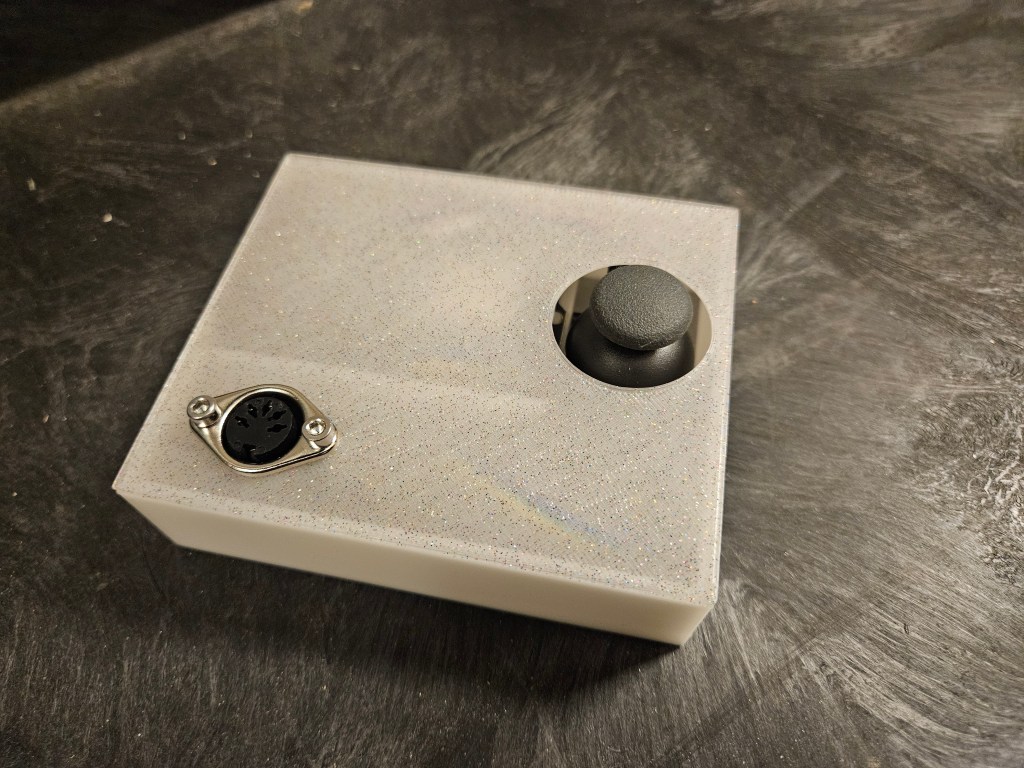
Detune the oscillators on a Behringer Pro VS Mini with an ESP32

Code for this project can be found at: https://github.com/pfeiffer3000/MIDI-CC—ProVSMini
This device sends MIDI continuous controller messages based on the position of a joystick. It’s built around an ESP32, and was designed to control oscillator detune values in a Behringer Pro VS Mini, but will work with any continuous control messages on any synth that can receive MIDI via a DIN socket.
FM synthesis is interesting. It can be super cheese or super funky. It can be really hard to dial in a great sound from an FM synthesizer or completely immersive. It can (sometimes poorly) emulate warm and fuzzy analog sounds or rip the paint off the walls with its awesome metallic and nasty timbres. It is known for space gong sounds, icy timbres, and metallic plinks.
The most famous FM synth is the Yamaha DX7 from the 1980s. It was responsible for a lot of synth sounds on songs like Take My Breath Away by Berlin, What’s Love Got To Do With It by Tina Turner, and Axel F by Harold Faltermeyer (from Beverly Hills Cop).
In the wake of the DX7, Yamaha put out a ton of FM synths like the FB-01, TX81z, or my favorite: the TG33 (shown below). If you want to try out FM synthesis, DEXED is an awesome 6-operator software synthesizer that is free and open source. You can use it stand-alone or in DAWs like Ableton, and it also loads DX7 patches!

Two things that I love about the TG33 are its introduction of vector synthesis to the FM mix and its giant joystick. The TG33 isn’t really an FM synth, but it has FM sounds alongside 12-bit samples of other waveforms. While the sound can be really cool, it can be a bit weak in sound quality.
The joystick allows a player to modulate certain aspects of the sound in real time, or record the motions for automatic playback. The joystick can control things like the mix between the four oscillators (A, B, C, and D) or the level of detuning of each of the oscillators. This makes for some really cool or weird sounds, especially when you mess around with their “random” oscillator assignments and joystick motion settings.
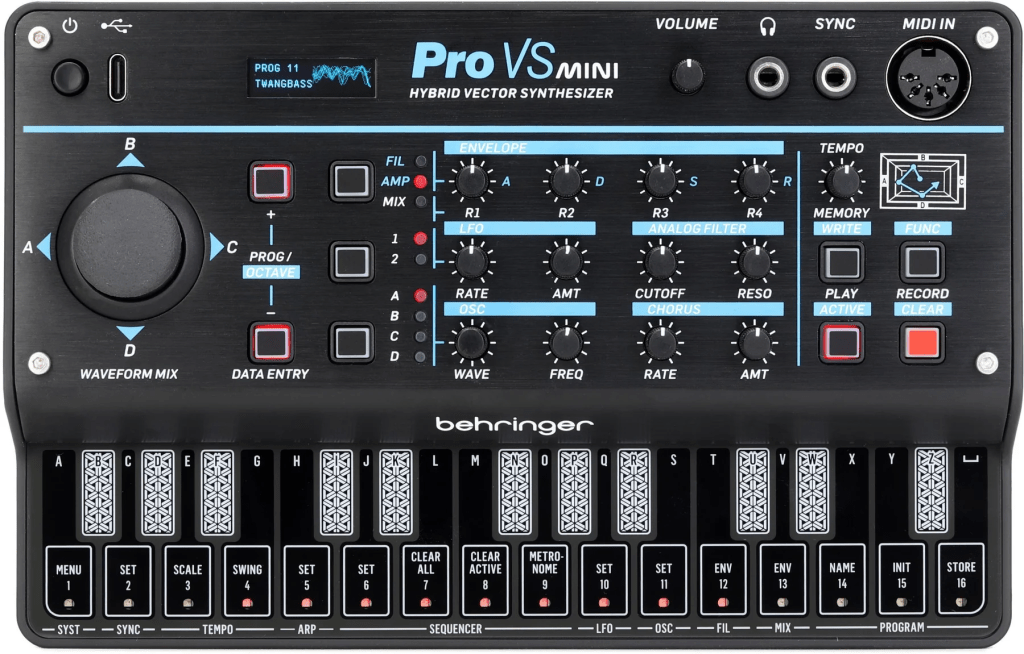
When Behringer announced the Pro VS Mini, I was super excited to see a new version of something that looked like a mini vector synthesizer. So, I bought one! There are a lot of cool waveforms for its four oscillators, a decent low pass filter, and a joystick that controls the relative levels of the oscillators. While you can awkwardly record a pattern of joystick motions to control the volume of each sound, it doesn’t yet have the capabilities that I liked about the TG33, namely the detune control.
Behringer recently updated the Pro VS Mini’s firmware to add some good stuff, like another polyphonic voice, a reverb setting, and some portamento. And it got me thinking that I could add my own control for detune, to help make this feel more like the TG33. Behringer’s documentation listed that each of the Pro VS Mini’s oscillators could be detuned with its own MIDI continuous controller (cc 111 – 114). So, I attached a joystick, which is really just two potentiometers, to an ESP32 to send MIDI CC messages via one of the ESP32’s serial out pins.
The MIDI DIN port has five pins, three of which are needed to connect to a MIDI circuit. Check Sparkfun’s MIDI Tutorial for more info on how to wire up a MIDI jack. For this build, I connected pin 2 to ground, pin 4 to a 220Ω resistor then to +5V, and pin 5 to a 220Ω resistor then to pin 17 of the ESP32. Pin 17 is the TX2 pin, or the third serial communications port of the ESP32. The first serial port (TX0) is the one that talks to computers via the USB cable.

The joystick has five pins that connect to the ESP32 like this:
- GND –> ground
- +V –> positive voltage (3.3V for ESP32, or 5V for Arduino)
- VRX –> pin 32, one of the ADC input pins of the ESP32
- VRY –> pin 33, another ADC input
- SW –> pin 25 (optional)
VRX and VRY are connected to the potentiometers on the joystick in the x and y directions. The SW is the pushbutton actuated by pushing down on the joystick. I don’t use the button in this sketch, but I attached it in case I wanted to use it in the future. I picked pins 32, 33, and 25 because they were all next to each other on the ESP32.
The code uses the Serial2 output from the ESP32, which comes out of pin 17. You have to initialize it in the setup() function with “Serial2” instead of the usual “Serial” (without the 2). This preserves the serial communication with any computer connected via the USB cable, and doesn’t muck up machines talking to each other.
Because this project is centered around the ESP32, there is room for development that incorporates more buttons, joysticks, sliders, WiFi, or Bluetooth connections. The code below demonstrates how to send a noteOn, noteOff, and continuous controller message. Each of those types of messages sends three sections of information: the type of control (note on, note off, or cc), and then two more pieces of information specific to the type of message.
The note on and note off both start with their respective codes, followed by the note number, and then the velocity. Note number and velocity are usually associated with pitch and volume respectively, but they can be mapped to all sorts of cool stuff, like envelope attack, filter cutoff, or LFO speed. The mappings depend on the synthesizer you’re working with.
The continuous control message starts with the control change command (0xB0 or 176), followed by the CC number and its value. For the Pro VS Mini, the CC number is in the range of 111 to 114. Oscillator A’s detune is controlled by CC 111, osc B is controlled by CC 112, etc. Behringer states that each CC responds to values in the range of 0-99, which is why each of the mappings of the pot’s analogRead() values ranges from 0 to 99 or 99 to 0.
I hope to add a simple record feature to the controller that would record the motion of the joystick and play it back continuously on a loop while a note is on, or a mini keyboard of pentatonic keys with a tonic set by a slide pot, or something else cool. Right now it’s been fun to play around with the Pro VS Mini’s volume joystick and my detune joystick and a ton of effects for some big space sounds.
Thanks for reading!!
MIDI_CC_provsmini.ino
// Outputs MIDI control messages based on the position of a joystick
// Controls the detune of 4 oscillators via continuous control messages
// in a Behringer ProVS Mini synthesizer
// Osc A: cc 111 (left)
// Osc B: cc 112 (up)
// Osc C: cc 113 (right)
// Osc D: cc 114 (down)

// The DIN port viewed from the back (not the side the cable comes from):
//
//  1       3
//   4     5
//      2
// pin 1 = not connected
// pin 2 = connected to ground
// pin 3 = not connected
// pin 4 = connected to 220 ohm resistor, then to +5V
// pin 5 = connected to 220 ohm resistor, then to TX2 (pin 17) of the ESP32


#include <Arduino.h>

#define LED_BUILTIN 2
#define POT_X 32
#define POT_Y 33
#define BUTTON 25

void noteOn(int pitch, int velocity) {
  // Turns
  Serial2.write(144);    // 0x90 = 144  this is the note on command
  Serial2.write(pitch);
  Serial2.write(velocity);
}

void noteOff(int pitch, int velocity) {
  Serial2.write(128);    // 0x80 = 128  this is the note off command
  Serial2.write(pitch);
  Serial2.write(velocity);
}

void controlMsg(int cc_number, int value) {
  Serial2.write(176);  // 0xB0 = 176  this is the control change command
  Serial2.write(cc_number);
  Serial2.write(value);
}

void playNote_onoff() {
  // Plays a single note for 700 ms repeatedly, for testing purposes
  // MIDI notes range from 0 - 127
  // Middle C is note 60
  int note = 60;
  noteOn(note, 100);
  digitalWrite(LED_BUILTIN, HIGH);
  delay(700);

  noteOff(note, 0);
  digitalWrite(LED_BUILTIN, LOW);
  delay(300);
}


void setup() {
  // Set MIDI baud rate
  // "Serial2" is the TX2 output of the ESP32
  // Connect this to pin 4 of the DIN jack
  Serial2.begin(31250);

  pinMode(LED_BUILTIN, OUTPUT);
  pinMode(POT_X, INPUT);
  pinMode(POT_Y, INPUT);
}

void loop() {
  // read the joystick x and y pots
  int x_value = analogRead(POT_X);
  int y_value = analogRead(POT_Y);

  // check the position of the joystick
  // if the joystick is in the left half, control osc A, etc.
  if (x_value < 2048) {
    // osc A ==> cc 111
    int x_map = map(x_value, 0, 2047, 0, 99);
    controlMsg(111, x_map);
  }
  else {
    // osc C ==> cc 113
    int x_map = map(x_value, 2048, 4095, 99, 0);
    controlMsg(113, x_map);
  }

  if (y_value < 2048) {
    // osc B ==> cc 112
    int y_map = map(y_value, 0, 2047, 0, 99);
    controlMsg(112, y_map);
  }
  else {
    // osc D ==> cc 114
    int y_map = map(y_value, 2048, 4095, 99, 0);
    controlMsg(114, y_map);
  }

  // playNote_onoff();
}
 DJ Pfeif
Leave a comment